The modeling concept
The user interface of JewelSuite Subsurface Modeling is organized in workflows, sets of task related buttons, arranged chronologically in a strip at the top of the window. The strip reflects the main stages of reservoir modeling, from data import via static reservoir model building to reservoir simulation, with the corresponding strips respectively called data, prepare, modeling
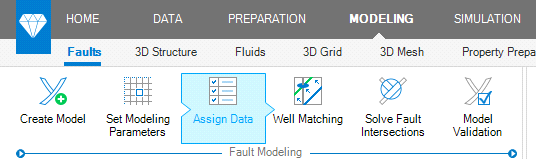
The Fault Modeling workflow in the Faults sub-strip. When activated, workflow buttons have arrows to indicate they are part of a workflow click to enlarge
Each workflow has a recurring pattern:
- Creation of a model (e.g. a fault model)
- Assignment of data to this model (e.g. the faults)
- Performing the modeling steps (e.g. editing, data analysis and construction of a watertight fault model)
- Validation and QC steps
At the end of each workflow, a data object (e.g. a validated fault model) is stored in the JewelExplorer folder structure, which is similarly organized as the associated sub-strip. The newly created object is highlighted in the JewelExplorer, but not visible in the active view yet. To visualize it, you use the checkboxes in the JewelExplorer.
The guided workflows and ordered data folders provide efficiency and clarity and ensure the necessary steps are taken at each stage of modeling. The workflows are flexible and support iterative ways of working. You can revisit each step by clicking on the relevant button in the strip, incorporating new data or making the required changes. Alternatively, you can create multiple scenarios at each modeling step by making a copy, or creating a new version by running the workflow again.